Secure Your Home with Keypad Door Locks
Introduction to Keypad Door Locks
Struggling with keys in the dark, being locked out after a jog, or fretting over misplaced spare keys under doormats—these common annoyances highlight why more than 45% of American households are projected to embrace smart lock technology by 2025, as per recent market analysis. The keypad door lock is a highly practical solution in this expanding market, doing away with physical keys while retaining the simplicity that homeowners seek.
Unlike conventional deadbolts that depend on easily duplicated metal keys, keypad systems use numeric codes for access—a major transformation in home security. This technology isn’t new; commercial buildings have relied on keypad entry for years. What has changed is the affordability and integration potential. The digital door lock market is anticipated to grow substantially by 2033, mainly driven by homeowners looking for convenience and improved security.
This guide covers everything from choosing the right model for your door type, installing the hardware, programming user codes, to maintaining optimal performance. Whether you’re upgrading a single entry point or planning a comprehensive home access control system, understanding the basics can help avoid costly errors and ensure reliable operation for years to come.
Prerequisites: What You’ll Need Before Installation
Before installing your keyless door lock, ensure you have the necessary tools and check your door’s compatibility. Most installations require a Phillips-head screwdriver, measuring tape, and a drill with bits matching your lock’s mounting holes. Compare the manufacturer’s template with your door’s backset—the distance from the door edge to the center of the existing deadbolt hole, usually 2⅜ or 2¾ inches.
Door thickness is crucial. Standard residential doors are 1⅜ to 1¾ inches thick, so verify yours before purchasing. Metal doors might need special drill bits, while glass doors often require professional installation to avoid damage.
Assess your door’s current hardware condition. If the strike plate or door frame is worn, address these issues first—a shaky frame can undermine even the most advanced keypad system. Most modern keyless door locks come with installation templates and mounting hardware, but make sure your package includes batteries (usually four AA), strike plates, and all necessary screws before you start. A practical step is testing your existing deadbolt’s operation before removal—a smoothly functioning mechanism indicates proper door alignment, while resistance suggests potential installation challenges ahead.
Step-by-Step Guide to Installing a Keypad Door Lock
Installing an electronic door lock usually takes 30 to 45 minutes with basic tools and doesn’t require professional skills. The process is straightforward: remove the old hardware, prepare the door opening, install the new mechanism, and test thoroughly.
Before beginning, power down your lock if it’s battery-operated by removing the battery compartment cover—this prevents accidental programming during installation. Lay out all components from your kit and identify each piece using the manufacturer’s diagram. Most systems include an exterior keypad assembly, interior mounting plate, strike plate, screws, and battery pack.
The installation process is divided into five main stages: removing the old lock, preparing the door, mounting the exterior assembly, attaching the interior unit, and programming. Each stage includes verification points to catch errors early. Keep your phone handy to photograph the existing setup—these reference shots can be invaluable if you need to troubleshoot or temporarily reinstall the old lock.
According to market analysis, proper installation significantly impacts the projected 11% annual growth in adoption rates through 2033, as poorly installed units lead to negative user experiences. Typically, the next step involves systematically removing existing hardware, where attention to detail prevents door damage.
Step 1: Remove the Existing Lock
Begin by unscrewing the interior mounting plate from your current deadbolt. Most locks attach with two screws visible on the inside handle or mounting plate—remove these first, then gently pull the interior assembly away from the door. The exterior part should slide out through the front once the interior is removed.
Next, unscrew the digital keypad lock‘s deadbolt latch from the door’s edge. This latch usually has two screws holding it in the strike plate cutout. Keep all screws organized, as some digital lock manufacturers include installation hardware that may not fit your existing holes—your old screws could serve as backups.
Pro tip: Take a photo of the existing lock assembly before disassembly. This reference shot aids troubleshooting if the new lock’s orientation seems unclear during installation.
Clean the door surfaces where the old lock was located, removing any accumulated dirt or paint debris. A clean installation surface ensures your new lock sits flush against the door, preventing gaps that could compromise security or weather sealing.
Step 2: Align the New Keypad Lock
Position your new smart door lock by threading the tailpiece through the hole where the old deadbolt cylinder was. The alignment process determines whether your installation succeeds or becomes a frustrating afternoon of adjustments—the exterior keypad assembly must sit flush against the door while the interior mechanism catches properly.
Hold the exterior assembly firmly against the outside of your door while feeding the cable through to the interior side. Most modern keypads include a cable management channel to keep wiring organized during installation. Ensure that the mounting holes on both sides align perfectly before inserting screws. A common issue is slight misalignment causing the bolt mechanism to stick or fail to retract fully.
Use the manufacturer’s template if provided—it marks exact screw placements and prevents the exterior unit from rotating once mounted. Insert screws loosely at first, allowing minor adjustments as you check the bolt’s smooth operation. The strike plate on your door frame should align with the bolt’s path without friction.
Step 3: Secure and Test the Lock
Tighten the mounting screws until the keyless entry lock is flush against your door, but avoid over-tightening—stripped screw holes are surprisingly common. Many installers make the mistake of cranking down the screws as hard as possible, which can crack the mounting plate or create uneven pressure that prevents smooth operation.
Insert the batteries according to the manufacturer’s diagram, then program your first access code through the keypad. Most models require you to press a specific sequence like [Program] + [Master Code] + [New User Code] + [#]. Test the lock five times with your new code before putting away your tools—this confirms the latch bolt extends fully and the deadbolt engages without binding.
Try locking and unlocking from both sides of the door. The keypad should respond immediately to correct codes, and the mechanical operation should feel solid without excessive play. If the bolt drags or the keypad feels loose, check your alignment from Step 2 before the lock settles into poor positioning.
Safety and Security: Are Keypad Locks Safe?
The security effectiveness of keypad locks often centers on several factors: the deadbolt mechanism itself, the programming quality, and resistance to common attack methods. Modern keypad systems typically include Grade 1 or Grade 2 ANSI/BHMA-rated deadbolts that meet the same physical security standards as traditional locks.
Electronic vulnerabilities present different challenges than mechanical ones. Quality keypad locks resist code-guessing attempts through lockout periods—usually three failed attempts trigger a 30-second to 3-minute delay. However, cheaper models sometimes lack this protection, making them vulnerable to brute-force attacks. The scramble feature (randomizing button displays) prevents thermal imaging attacks, where someone could theoretically detect recently-pressed buttons.
Physical security considerations remain paramount. Battery-powered keypads eliminate the risk of power outages disabling your lock, and most alert you weeks before batteries die. Weather-resistant models with IP65 ratings or higher prevent moisture infiltration that could freeze mechanisms or corrode electronics.
One practical advantage: keypad locks eliminate the risk of lost or copied keys entirely. No locksmith can duplicate your access code without your knowledge, though this assumes you change codes regularly and don’t share them liberally. What typically happens is homeowners set one code at installation and never update it—undermining the security flexibility these systems offer.
Comparison: Keypad Locks vs. Traditional Locks
The fundamental trade-off between keypad and traditional locks centers on convenience versus simplicity. Traditional deadbolts require no batteries, never experience software glitches, and work identically in any weather—they’re mechanically bulletproof. Keypad locks eliminate key management entirely but introduce power dependencies and occasional firmware updates.
Security-wise, both systems can be equally robust when properly installed. A Grade 1 deadbolt offers the same physical protection whether operated by a key or a touchscreen keypad. The vulnerability profiles differ: traditional locks face lock-picking and key duplication risks, while keypad systems are susceptible to code-sharing and electronic tampering. According to market analysis, smart locks now account for a growing segment as consumers prioritize access control flexibility.
Cost presents another clear distinction. Traditional deadbolts typically run $30–$80, while keypad systems start around $100 and scale upward with features. However, one consideration tips the balance: rekeying costs after lost keys quickly erode traditional locks’ initial savings—keypad locks simply require a code change at no additional expense.
Maintenance Tips for Keypad Door Locks
Regular maintenance extends the lifespan of keypad locks and prevents frustrating failures. Battery replacement tops the priority list—most units provide low-battery warnings weeks before depletion, giving ample time to swap in fresh cells. Set calendar reminders every 8-10 months as a proactive measure, since temperature extremes accelerate drain rates.
Clean the keypad quarterly using a microfiber cloth slightly dampened with water. Avoid harsh chemicals that degrade plastic surfaces or damage LCD displays. Pay attention to the deadbolt mechanism by applying graphite lubricant (never oil-based) to moving parts annually—this prevents sticking that can cause code entry failures.
Inspect weatherstripping around outdoor installations twice yearly. Moisture infiltration through compromised seals corrodes internal electronics and causes premature failure. Test all programmed codes monthly to catch synchronization issues early. What typically happens is that forgotten codes accumulate over time, eventually filling memory and preventing new entries.
Update firmware when manufacturers release patches—these often address security vulnerabilities and improve battery efficiency. With the smart locks market experiencing significant growth, manufacturers now provide better support tools for maintaining these systems remotely.
Limitations and Considerations
Keypad locks aren’t universal solutions—specific vulnerabilities demand honest assessment before installation. Electronic failures during power outages pose minimal risk since most units operate on batteries, but prolonged battery drain without replacement creates genuine security gaps. A locked-out homeowner at 2 AM represents the real-world cost of neglected maintenance.
Code complexity creates a paradox: simple patterns (1-2-3-4) invite unauthorized access, while overly complex combinations frustrate legitimate users and increase forgotten code incidents. The U.S. smart lock market projects continued growth, yet adoption rates reveal consumer hesitation around reliability concerns.
Weather resistance varies dramatically across models. Coastal environments accelerate corrosion on lower-tier units, while extreme cold affects LCD responsiveness and battery performance. Installation limitations matter too—retrofit models require specific door thicknesses and backset measurements that exclude older construction.
The digital footprint creates another consideration. Wi-Fi-enabled models introduce network vulnerability that traditional locks avoid entirely. However, basic keypad units without connectivity sidestep these cybersecurity concerns while retaining keyless convenience. Understanding your specific threat model—whether you prioritize physical security, digital privacy, or operational convenience—determines which trade-offs make sense for your situation.
Frequently Asked Questions About Keypad Door Locks
Can keypad locks be hacked remotely? Basic standalone keypad locks without WiFi can’t be hacked remotely—they operate independently of networks. Smart-enabled models with wireless connectivity introduce potential vulnerabilities, though encryption and regular firmware updates mitigate most risks. Physical tampering poses greater threats than digital attacks for standard keypads.
How long do batteries typically last? Most keypad locks operate 8-12 months on standard AA or AAA batteries, depending on usage frequency. High-traffic commercial installations may require quarterly replacements. Low-battery warnings typically trigger 30 days before failure, providing ample replacement time. Some models include emergency power ports for jump-starting dead units.
Are keypad locks weather-resistant? Exterior-rated models feature weather-resistant construction designed for temperature extremes and moisture exposure. IP65 ratings indicate dust-tight and water-resistant performance. However, condensation in extreme cold can occasionally freeze mechanisms—a limitation shared with traditional locks in harsh climates.
Can multiple users have different codes? Modern systems accommodate 20-100+ unique user codes, with administrator controls for adding or deleting access. Temporary codes support contractors or guests, auto-expiring after predetermined periods. This flexibility eliminates physical key management while maintaining detailed access logs.
Key Takeaways
Keypad door locks represent convergence technology—security hardware meeting software intelligence—with the digital door lock market projected to reach $8.27 billion by 2033. Installation takes 30-45 minutes for basic models, requiring minimal tools but careful alignment. Battery life averages 8-12 months with alkaline cells, though WiFi-enabled versions drain faster. Security depends on implementation: standalone numeric pads resist remote attacks but remain vulnerable to code sharing, while smart-enabled models gain temporary access controls at the cost of expanded attack surfaces. The critical decision hinges on whether convenience features justify connectivity risks—a tradeoff that varies dramatically between rental properties, family homes, and high-security applications. What matters most isn’t the technology itself but matching capability to specific threat models.
Are door locks with keypads safe?
Keypad door locks offer comparable or superior security to traditional keyed locks when properly configured, with industry data showing they eliminate the most common residential vulnerability—physical lock picking, which accounts for less than 2% of break-ins. The real-world safety of these systems depends on implementation: a six-digit PIN provides over one million possible combinations, making brute-force attacks impractical given most systems lock out after 3-5 failed attempts.
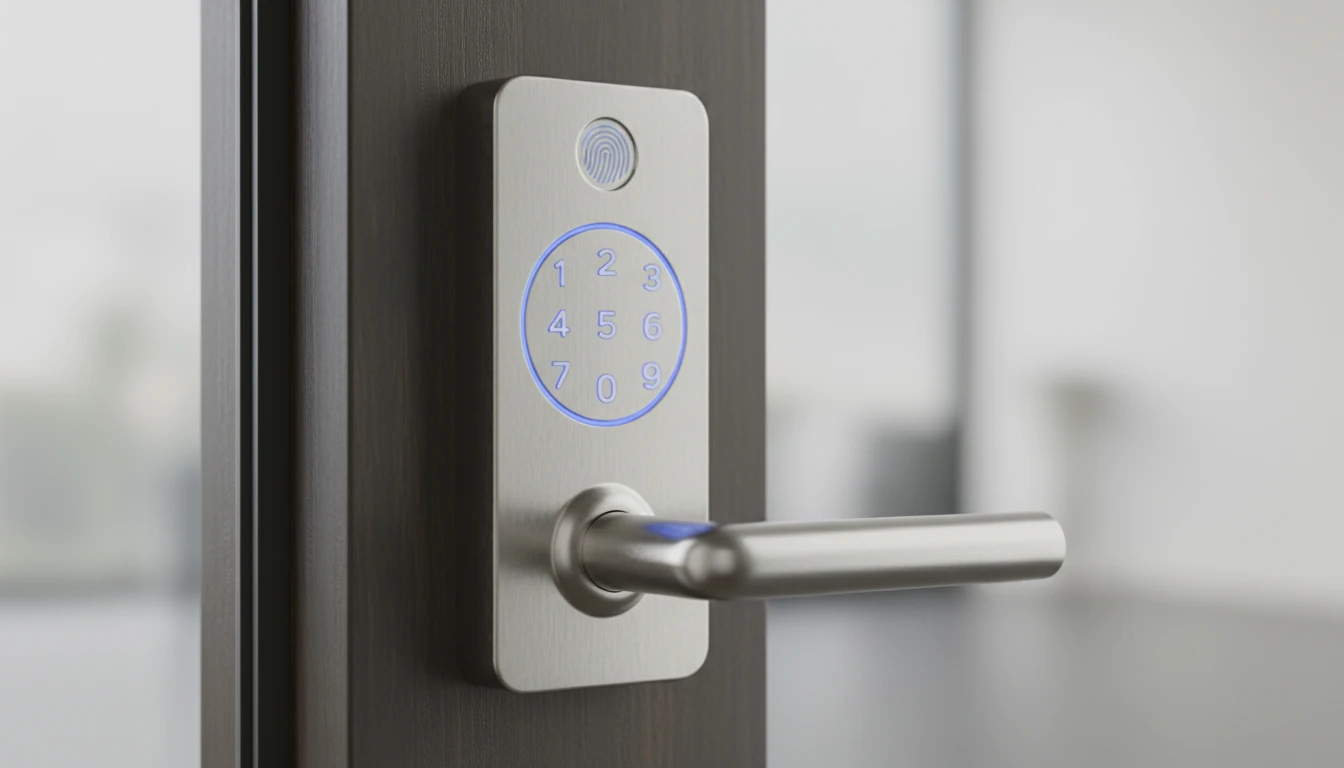
Core security advantages include elimination of key-related vulnerabilities—no lost keys, unauthorized copies, and or lock bumping concerns. However, standalone keypad models without encryption are vulnerable to code observation or shoulder surfing, making installation position crucial. A practical approach is mounting the keypad at chest height with visibility shielding from common sightlines. What typically happens with security incidents involves user error rather than system failure—sharing codes too liberally or using obvious combinations like “1234.” Industry analysis indicates that biometric-enhanced keypad systems address this limitation by adding fingerprint verification as a second authentication factor, significantly elevating security beyond traditional mechanical locks while maintaining code-based convenience for guests or service providers.
What locks do police recommend?
Law enforcement agencies typically recommend Grade 1 deadbolts paired with keypad systems that feature anti-tampering alerts and backup mechanical components. The preferred configuration combines physical security fundamentals—reinforced strike plates, hardened bolts at least one inch long, and drill-resistant cylinders—with digital convenience.
Police crime prevention units consistently emphasize multi-layered security rather than relying on any single technology. A keypad lock serves as one component within a comprehensive approach that includes proper door frame reinforcement, adequate exterior lighting, and visible security presence. Many departments specifically warn against replacing all mechanical locks with purely electronic systems, particularly for homes with single points of entry. Commercial-grade keypad locks meeting ANSI/BHMA Grade 1 standards receive strongest endorsement for residential use. These locks withstand 800,000 to 1 million operational cycles and feature reinforced components that resist physical attacks. The digital component should include audit trail capabilities, automatic lockout after failed attempts, battery backup systems—features that allow homeowners to track access patterns, and prevent code-guessing attacks. For rental properties and vacation homes, law enforcement often recommends keypad systems with remote management capabilities that allow code changes without physical access. However, these should maintain mechanical override options accessible only to property owners. This dual-system approach prevents complete lockout during power failures or electronic malfunctions while maintaining the access control benefits that make keypad locks attractive for managing multiple users.
Is Schlage or Kwikset better?
Schlage generally outperforms Kwikset in durability testing and security ratings, though both brands meet industry standards for residential keypad locks. The choice often depends on specific feature requirements and budget considerations rather than fundamental security differences.
Schlage keypad locks typically carry ANSI/BHMA Grade 1 or Grade 2 certifications, indicating superior resistance to forced entry and longer operational lifespans. Their mechanical components often feature hardened steel construction and patented cylinder designs that resist picking and drilling. Kwikset models, while frequently rated Grade 2 or Grade 3, excel in user-friendly installation and affordable pricing tiers.
Battery longevity represents one practical distinction—Schlage models commonly provide 12-18 months of use on standard batteries, while Kwikset systems average 8-12 months under similar conditions. However, Kwikset’s SmartKey re-keying technology offers unique convenience for households needing frequent code changes or physical key modifications.
For high-security applications or commercial entrances, Schlage’s track record in institutional settings provides added confidence. Kwikset serves residential users prioritizing ease of installation and contemporary design aesthetics. Both manufacturers have adapted to growing smart lock demand, offering WiFi-enabled and smartphone-integrated options.
Understanding terminology differences becomes essential when comparing models—a topic the next section addresses directly.
What is a door lock with a code called?
A door lock with a code is typically called a keypad lock or electronic keypad lock. Industry professionals also refer to these devices as digital locks, push-button locks, or code locks, depending on their specific technology and features.
The terminology varies slightly based on functionality. Keypad locks specifically describe units with numbered buttons for code entry, while digital locks is a broader category that encompasses any electronically-controlled access system. Smart keypad locks add connectivity features like WiFi or Bluetooth, distinguishing them from standalone electronic models.
Within the broader category, the Digital Door Lock Systems Market includes both basic code-entry systems and advanced smart locks. The distinction matters when shopping—a “keypad lock” implies code entry capability, while “electronic lock” might include fingerprint or card-access models without keypad functionality.
Understanding these terms helps clarify product searches and ensures you’re comparing similar security solutions when evaluating options for your home.
What is a good keypad lock for the home?
A good keypad lock for the home combines reliable construction, intuitive operation, and appropriate security features for residential use. The best models feature weather-resistant keypads rated for outdoor exposure, backup power options when batteries deplete, and keypads that